

Arduino or ESP32? It is the first question almost every student, hobbyist and engineer asks when starting an electronics project. Both are excellent, but they are built for different jobs. Picking the right one saves you money, wiring headaches and hours of debugging.
This guide compares the classic Arduino UNO, the newer Arduino UNO R4 WiFi and the ESP32 family, so you can choose the right board for your project.
Side-by-side comparison
| Arduino UNO R3 | Arduino UNO R4 WiFi | ESP32-S3 (N16R8) | |
|---|---|---|---|
| Processor | ATmega328P, 8-bit, 16 MHz | Renesas RA4M1, 32-bit Arm Cortex-M4, 48 MHz | Dual-core 32-bit, up to 240 MHz |
| Memory | 32 KB flash, 2 KB RAM | 256 KB flash, 32 KB RAM | 16 MB flash, 8 MB PSRAM |
| Wi-Fi / Bluetooth | No | Yes (via on-board ESP32-S3) | Yes, built in |
| Logic voltage | 5V | 5V | 3.3V |
| Shield compatible | Yes | Yes | No (different layout) |
| Best for | Learning, simple control projects | Learning + IoT with UNO shields | IoT, cameras, displays, heavy processing |
When to choose Arduino UNO
The Arduino UNO R3 is still the best board for learning electronics. It runs at 5V, so most sensors, relays and modules connect directly, and almost every beginner tutorial, book and school course is written for it.
- Your project reads sensors, drives motors, relays, LEDs or a small display.
- You do not need Wi-Fi or Bluetooth.
- You want to use UNO shields (motor drivers, LCD shields, relay shields).
- You are a student or beginner following tutorials.
When to choose Arduino UNO R4 WiFi
The Arduino UNO R4 WiFi keeps the familiar UNO shape, 5V logic and shield compatibility, but adds a much faster 32-bit processor, more memory, a 12×8 LED matrix and Wi-Fi/Bluetooth through an on-board ESP32-S3. It is the easiest way to move a UNO project online without rewiring.
When to choose ESP32
ESP32 boards are built for connected projects. They have Wi-Fi and Bluetooth on the chip, far more processing power and memory, and cost about the same as an UNO. Choose ESP32 when:
- Your project sends data to the internet, a phone app or a dashboard (IoT, home automation, smart meters).
- You need Bluetooth, for example to control a device from your phone.
- You are working with cameras, colour displays, audio or many sensors at once.
- You want deep-sleep modes for battery-powered devices.
The ESP32-S3 N16R8 has 16 MB of flash and 8 MB of PSRAM, plenty for displays, web servers and even small AI tasks. If your router is crowded on 2.4 GHz, the ESP32-C5 also supports 5 GHz Wi-Fi.
Important: 5V vs 3.3V
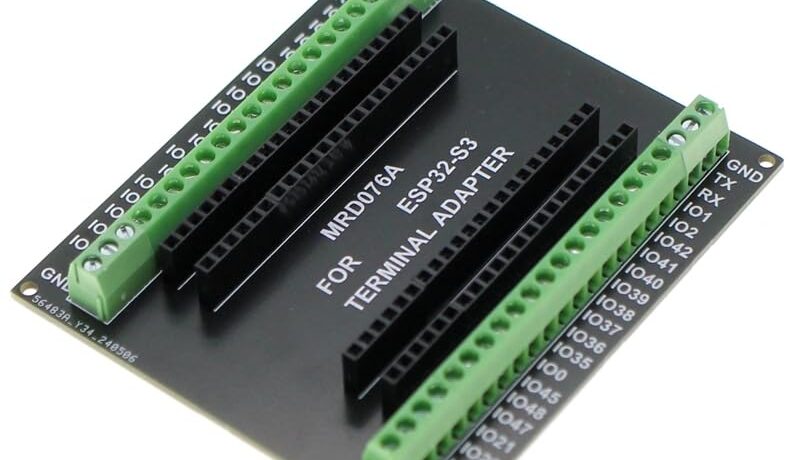
This catches many people out. Arduino UNO pins work at 5V, while ESP32 pins work at 3.3V and are not 5V tolerant. Connecting a 5V sensor output straight to an ESP32 pin can damage it. Use a logic level converter or a voltage divider, or choose 3.3V sensors. A screw-terminal shield also makes ESP32 wiring much tidier and more reliable.
Programming: same tools for both
Both boards can be programmed in the free Arduino IDE using the same C/C++ style code. For ESP32 you add the ESP32 board package from the Boards Manager. Many Arduino libraries work on ESP32 too, so moving a project from Arduino to ESP32 is usually straightforward.
Quick decision guide
- Learning electronics or a school project: Arduino UNO R3, or a starter kit.
- UNO project that needs Wi-Fi: Arduino UNO R4 WiFi.
- IoT, home automation, phone control: ESP32.
- Displays, cameras or heavy processing: ESP32-S3.
Frequently asked questions
Can I use Arduino shields on an ESP32?
Not directly. ESP32 development boards have a different pin layout and 3.3V logic. If you need UNO shields with Wi-Fi, the Arduino UNO R4 WiFi is the better choice.
Is ESP32 harder to learn than Arduino?
Slightly, mainly because of the 3.3V logic and the extra features. If you already know Arduino, you can start programming an ESP32 in the same IDE within minutes.
Which board is better for final-year projects?
For most final-year projects involving monitoring, automation or mobile apps, an ESP32 is the better choice because of built-in Wi-Fi and Bluetooth. For projects focused on control and sensors without connectivity, an Arduino UNO is simpler.
Shop development boards in Pakistan
Explore our Arduino-compatible boards, IoT development boards and modules and breakout boards, with delivery across Pakistan.
